The Best Apps to Add a Person to a Photo in 2026
Written by Mordechai Peretz · Updated: November 12, 2026 · 9 min read
What is the best app to add a person to a photo?
For a photo you already have, use an editor that blends a second picture of the person into the scene. NeedPS does it on iPhone and Android from one photo of the person and a typed sentence about where they stand. If you are still taking the group photo on a Google Pixel with Add Me, the camera adds the photographer instead.
The best app to add a person to a photo depends on whether the photo already exists. If you are taking the group photo right now on a Google Pixel with Add Me, the camera puts the photographer in the shot. For a photo you already have, you need an editor that works from a second picture of the person. In NeedPS that is the Add a person tool: you attach a photo of the person and type where they should stand.
We make NeedPS, so read this with that in mind: it is one entry of seven, and its limits are listed like everyone else's. Every price, free tier and platform in the table was read on November 12, 2026 from each maker's own pages, linked under Sources. Below: which route fits which situation, the seven options one by one, the table, and what no app on this list can promise.
Quick answer: which app to use
- The photographer is the one missing, you are still at the scene, and the phone is a Pixel with Add Me: Add Me in the Pixel Camera
- The photo already exists and someone was not in it: NeedPS, with a clear photo of the person and a sentence about where they stand
- You would rather do it in a browser on a computer: Fotor's add-person tool
- You already use a general AI chat app: Gemini or ChatGPT, then compare every face with the original
- You want to cut the person out and place them by hand: Picsart or Photoshop
Adding a loved one who has passed away
This is the most personal edit on this page, and the one where the source photo decides nearly everything, because nobody can take a new one. Use an editor that works from an existing picture: NeedPS, Fotor, Gemini, ChatGPT or Photoshop. Add Me cannot help here, since it needs the person in front of the camera.
Be ready for the limit: a small, faded or blurred portrait may not give a likeness the family recognizes, in any app. Our guide on how to add a deceased loved one to a family photo has requests to copy, what makes a usable source photo and a plain list of what will not work.
Adding someone to a wedding photo
A parent who died before the wedding, a grandparent who could not travel, a guest who missed the group shot. If a professional took the photos, ask them first: they hold the original files. To do it yourself, a posed group portrait in even light is far easier to work with than a dim reception shot, and a place at the end of a row is easier than one in the middle of an embrace. See how to add someone to a wedding photo for how to describe a position next to the bride or in the back row, and where it stops working.
The photographer, or a guest who missed the group shot
If everyone is still there, retake the photo. On a Pixel with Add Me the camera merges two shots so the photographer is in the picture, and on any other phone a timer or a passer-by does the same job with no editing at all.
Once the moment has passed, add the person from another photo taken the same day, in the same light and the same clothes if you can. A picture from the same event matches the scene better than anything from another day.
A team, class or reunion photo with someone missing
Rows of people at similar heights are a forgiving setting, as long as there is a gap or a free end of a row for the new person. Say which row and next to whom: "back row, right end, next to the man in the grey jacket". Add several people one at a time, using each result as the base for the next, and look again at the faces already in the photo after each step.
Two people who were never photographed together
Here there is no group to join, so one photo becomes the base and the other person is added to it. Choose as the base the photo with the better background and light, and pick a picture of the second person taken from a similar angle. The method, step by step, is in our guide on how to add a person to a photo without Photoshop.
1. NeedPS: describe where they should stand
NeedPS is an AI photo editor for iPhone and Android with a tool made to add a person to a photo. Choose Add a person, upload the base photo, attach a clear photo of the person and say where they go: "add her on the left, next to grandpa". The app places them in the scene and is built to match their lighting, shadows, color, scale and angle to it. The added person is built to stay recognizable from the photo you attach, but the result is a likeness: approximate, not guaranteed, and a little different on every run.
Best for: completing family and group photos after the fact, on a phone, without cutting out or placing anything by hand. Add several people one at a time, using each result as the base for the next. For a damaged old photo, restore it first and add the person to the restored version. Where it falls short: it needs a clear photo of the person, a pose with contact between people is harder than standing side by side, and there are no layers to adjust by hand afterwards. Cost: one-time packs of edits from $2.99 in the US App Store, no subscription needed. Monthly plans are optional, and prices vary by country.
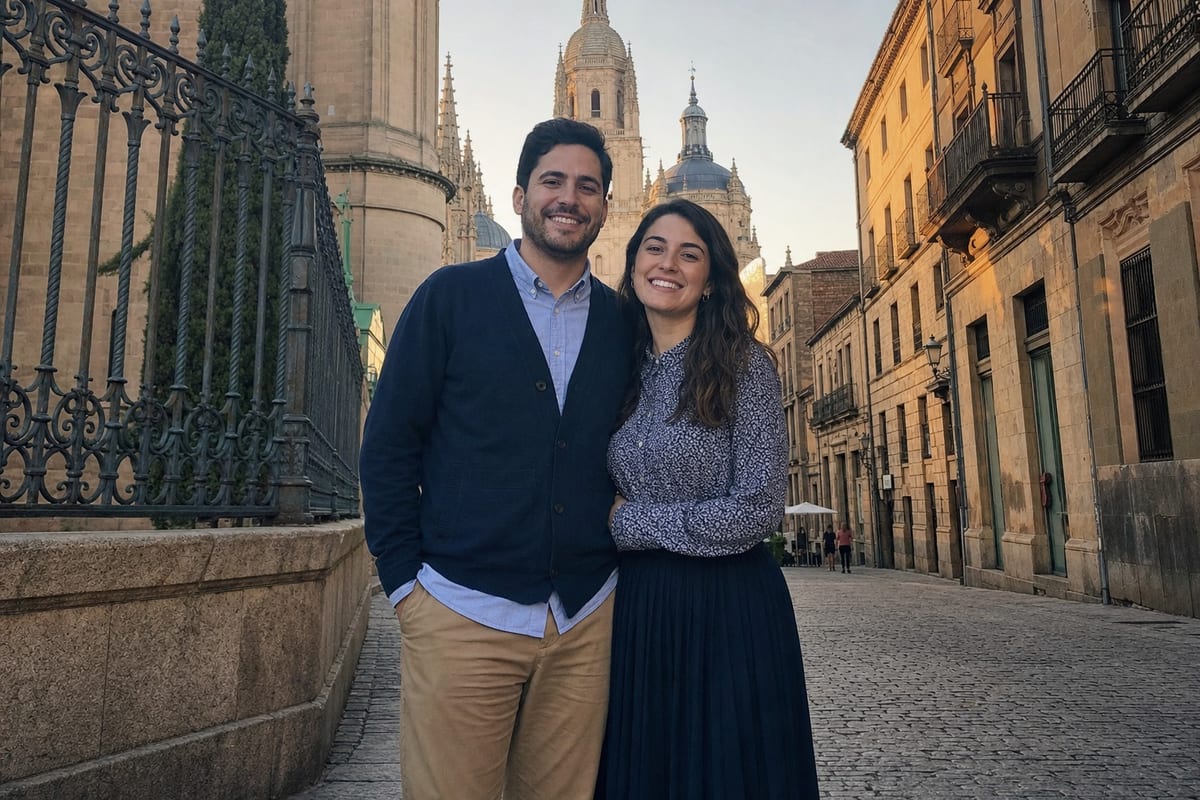 Before
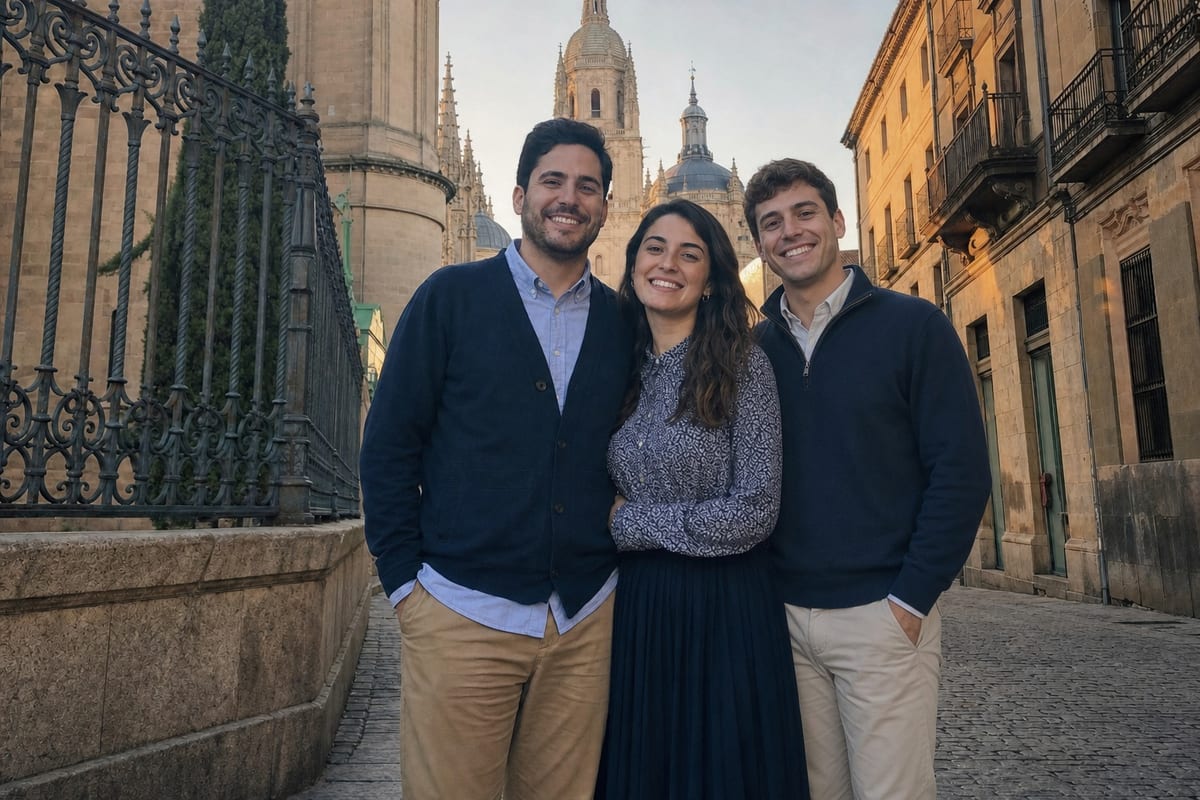 After
2. Add Me on Google Pixel: while you take the photo
Add Me is a Pixel Camera feature that Google launched with its Pixel 9 phones. You take the group photo, then swap places with someone in it; an on-screen overlay of the first shot helps them line up the second, and the camera combines the two shots into one photo with everyone in it.
Best for: making sure the photographer is in the shot. It works only at the moment you take the photo, in the same place and session, so it cannot add someone to an older picture, or someone who is not there. Cost: built into supported Pixel phones.
3. Gemini
Google's Gemini app can edit photos and blend several uploaded images into one with its Nano Banana image model. Upload the base photo and a photo of the person and describe the result you want.
Best for: quick experiments if you already use Gemini. A general chat app may redraw the whole picture, so compare every face, including the people who were already in the photo, with the original. Cost: free with a daily image quota; paid plans raise it. Google AI Plus listed at $4.99, Google AI Pro at $19.99 in the US App Store.
4. ChatGPT
ChatGPT can generate images and transform uploaded ones from a written request, so you can ask it to combine a photo of a person with a group photo.
Best for: people who already work in ChatGPT. As with Gemini, the image can be redrawn as a whole, so check the faces, hands and background against the original before you print or share. Cost: the app is free; paid plans are in-app purchases. ChatGPT Go listed at $8.00, ChatGPT Plus at $19.99 in the US App Store.
5. Fotor: an add-person tool in the browser
Fotor has a web tool made for this job. You upload a picture of the person, Fotor removes its background, and you then upload the photo you want to place them on. Its own page for the tool has a section about adding a deceased loved one to a photo.
Best for: people who would rather work in a browser on a computer. Fotor's page describes uploading the two pictures and does not mention typing a request. Cost: the online tool is free to use; some features and high-resolution exports may need a login or credits. Subscriptions listed from $6.99 (Fotor Pro - Week Plan) in the US App Store.
6. Picsart
Picsart is a photo and design app with a background remover for clean cutouts. The route here is manual: cut the person out of their own photo, then place the cutout on the group photo and size it yourself.
Best for: people who are comfortable placing and blending by hand. Matching the light and shadows is up to you. Cost: free to use, with paid plans for premium tools. Subscriptions listed from $4.99 (Picsart Gold Weekly) in the US App Store.
7. Photoshop
Adobe's Photoshop app for iPhone and Android can select a person with its Tap Select tool, combine multiple images and control how they come together with layers. Adobe's page for the app also describes a Harmonize feature that blends a subject with the background, and an AI Assistant you can type a request to.
Best for: full manual control and professional composites. It takes practice with selections, layers and light. Cost: free app with premium features. In-app purchases listed from $4.99 (Photoshop Mobile Firefly Monthly) in the US App Store.
How the seven compare
| App | How you tell it what to do | Platforms confirmed | Free tier | Starting price (US) |
|---|---|---|---|---|
| NeedPS | Attach a photo of the person and type where they stand | iPhone, Android, Windows | None: the download is free, edits are paid | $2.99 one-time pack (12 edits); no subscription needed |
| Add Me (Pixel Camera) | Take two shots and swap photographers; the camera combines them | Google Pixel phones, from Pixel 9 | Built in | Built in, nothing to buy |
| Gemini | Upload both photos and describe the result in a chat | iPhone, Android, web | Free with a daily image quota; paid plans raise it | Google AI Plus listed at $4.99, Google AI Pro at $19.99 |
| ChatGPT | Upload both photos and describe the result in a chat | iPhone, Android, desktop | The app is free; paid plans are in-app purchases | ChatGPT Go listed at $8.00, ChatGPT Plus at $19.99 |
| Fotor | Upload the person's photo, let it remove the background, then upload the photo to place them on | Web browser for this tool; Fotor also lists iPhone, Android, Windows and Mac apps | The online tool is free to use; some features and high-resolution exports may need a login or credits | Subscriptions listed from $6.99 (Fotor Pro - Week Plan) |
| Picsart | Cut the person out with its background remover, then place them by hand | iPhone, Android, web | Free to use, with paid plans for premium tools | Subscriptions listed from $4.99 (Picsart Gold Weekly) |
| Adobe Photoshop (mobile) | Select and combine the images by hand, or type a request to its AI Assistant | iPhone, Android | Free app with premium features | In-app purchases listed from $4.99 (Photoshop Mobile Firefly Monthly) |
Platforms are the ones confirmed on each maker's own pages or store listings, so an app may run on more devices than listed. Prices are the cheapest plan or pack in the in-app purchase list of each app's US App Store listing (one-off credit and storage add-ons are left out); they differ by country and change often.
- Adds someone to a photo you already have: NeedPS, Gemini, ChatGPT, Fotor, Picsart and Photoshop; Add Me works only while you shoot
- You type where the person goes: NeedPS, Gemini and ChatGPT; you place the person yourself in Picsart and Photoshop
- Built to change only what you asked for: NeedPS; a general chat app may redraw the whole image, so compare the faces
- Runs on iPhone and Android: NeedPS, Gemini, ChatGPT, Picsart and Photoshop; Add Me is Pixel only; Fotor's add-person tool was confirmed in a browser
What no app on this list can promise
- An exact face. Every tool here builds the added person from the photo you give it, so the result is a likeness. Small, blurred or very old source photos give the weakest ones.
- The same result twice. Each run is a new attempt; if the first is off, the next may be better or worse.
- A natural result from mismatched photos. A flash portrait placed into a sunset scene, or a face shot from above placed into a group taken at eye level, tends to look added.
- Contact between people. Standing next to someone is the simple request; an arm around a shoulder or holding hands means inventing parts of both people.
- A record of the day. An edited picture is an edit. Say so when you share it, above all with family photos.
Tips for a natural-looking result
- Use a photo of the person taken in similar light and from a similar angle to the group photo
- Pick a photo where they are fully visible, not cropped at the head or shoulders
- Say where they stand and next to whom, and whether they are in front of or behind someone
- Check the scale: feet on the same ground as the others, heads at believable heights
- Look at the shadow under and beside them; a missing shadow gives an edit away
Last verified: November 12, 2026, for the table, on each maker's own pages and US App Store listing
Sources
- NeedPS on the US App Store (Apple)
- How we built Pixel's Add Me feature (Google)
- Google Gemini on the US App Store (Apple)
- Generate & edit images with Gemini Apps (Google)
- ChatGPT on the US App Store (Apple)
- Image generation guide (OpenAI)
- Images in ChatGPT (OpenAI Help Center, read November 7, 2026)
- Add Person to Photo (Fotor)
- Fotor on the US App Store (Apple)
- Picsart on the US App Store (Apple)
- Picsart pricing (Picsart)
- Adobe Photoshop on the US App Store (Apple)
- Photoshop on mobile (Adobe)
Related guides
- How to Add a Deceased Loved One to a Family Photo
- How to Add Someone to a Wedding Photo After the Day
- How to Add a Person to a Photo Without Photoshop
- The Best Apps to Remove People From Photos in 2026 (Free and Paid)
- The Best Apps to Restore Old Photos in 2026 (Free and Paid)
- How to Remove Your Ex From a Photo on iPhone or Android
Frequently asked questions
What app can add a person to a photo?
For a photo you already have, NeedPS adds a person from a second photo and a description of where they go. Gemini, ChatGPT, Fotor, Picsart and Photoshop can also do it, each in its own way. On a Google Pixel with Add Me, the camera adds the photographer while you take the picture.
Can I add someone who was not there to a group photo?
Yes. Upload the group photo and a clear photo of the person to NeedPS and describe where they should stand. The app is built to keep both them and the people already in the photo recognizable. The added person is a likeness made from the photo you attach, so check the face before you share it.
Is there a free app to add a person to a photo?
Add Me is built into supported Pixel phones. Gemini has a free daily image quota, the ChatGPT app is free with paid plans, and Fotor says its online tool is free to use, with a login or credits for some features. NeedPS is a paid app: one-time packs from $2.99 in the US App Store, no subscription needed, and a 3-day free trial in the Android and iPhone apps in most countries.
What is the best app to add a person to a photo on iPhone?
For a photo you already have, start with an app made for adding a person from a second photo. On this list NeedPS (iOS 15.1 or later), Gemini, ChatGPT, Picsart and Photoshop have iPhone apps, and Fotor's tool runs in a browser. Add Me is a Pixel Camera feature and is not on iPhone.
What is the best app to add a person to a photo on Android?
NeedPS, Gemini, ChatGPT, Picsart and Photoshop all have Android apps, and Fotor's tool runs in a browser. On a Google Pixel with Add Me you can also add the photographer at the moment you take the picture.
Can I add a deceased family member to a photo?
Yes, if you have a clear photo of them. In NeedPS, attach it and describe where they should be in the family picture. The result is a likeness, approximate and not guaranteed, and a small, faded or blurred portrait may not give one you are happy with. If the photo of them is old or damaged, restore it first.
How many photos do I need to add a person?
Two: the photo you are adding to, and one clear photo of the person. In NeedPS you attach the person's photo and type where they go. Add Me is the exception: it takes two shots of the same scene, one after the other.
Will the added person look exactly like them?
No app can promise that. The person is rebuilt from the photo you provide, so the result is a likeness that varies from run to run. A sharp, well lit photo with the face toward the camera gives the best chance; a tiny or blurred one often does not look like them.
Does Add Me work on iPhone or on older photos?
No. Add Me is a Pixel Camera feature, and it combines two shots taken in the same session and the same scene. To add someone to an existing photo, on iPhone or Android, use an editor such as NeedPS.
Want to try it on your own photo?
Download NeedPS, upload a photo and type what you want, in any language. That is all.
Download NeedPS free